

Most recent scam and phishing events
SMS phishing
-
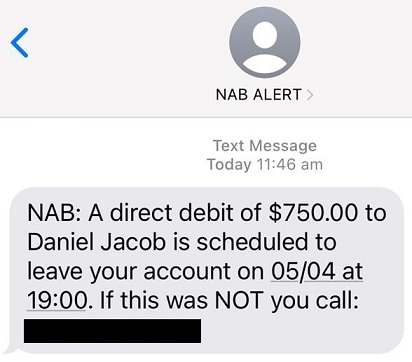
The SMS contains a number for a fake call centre asking you to verify a scheduled payment. Do not call the number or provide any information.
SMS details (March 2024)
- The message claims to be from NAB stating you’ve scheduled a payment to a payee.
- It asks you to call the number listed in the SMS if this wasn’t you.
- This number is for a fake call centre that may request remote access to your computer and bank accounts or ask you to provide personal or banking information.
SMS phishing example
How to protect yourself
- Do not call the number or provide any information.
- If you have received this type of text message, please forward it to 0476 220 003 (047 NAB 0003) or take a screenshot, email it to phish@nab.com.au and then delete the text message.
- If you have called the number after receiving this type of email or text message, contact us on 13 22 65 or visit your nearest NAB branch immediately.
-
The SMS urges you to click a fake link to update your personal info. Do not click on the link or provide any information.
SMS details (Sep 2023)
The message claims to be from ubank stating your transfer limit has been restricted.
It asks you to click on a link to update your personal information.
This link takes you to a fake ubank login page asking for your ubank login details and additional personal information.
SMS phishing examples

How to protect yourself
If you have received this type of text message, please forward it to 0476 220 003 (047 NAB 0003) or take a screenshot, email it to phish@nab.com.au and then delete the text message.
If you have clicked the link and submitted information after receiving this type of text message, contact us on 13 22 65.
-
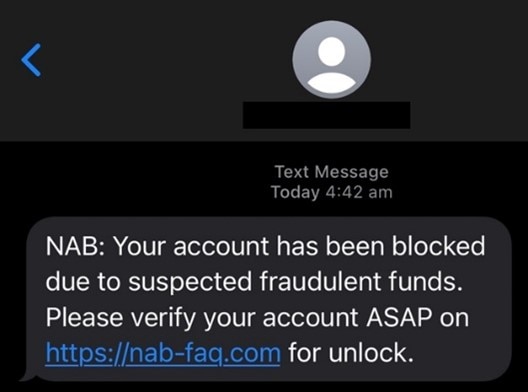
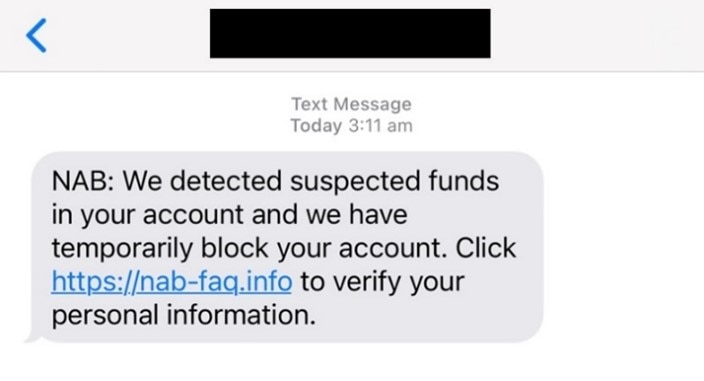
The SMS urges you to click a fake link to verify and unblock your account. Do not click on the link or provide any information.
SMS details (July 2023)
- The message claims to be from NAB stating your account has been blocked due to suspected fraudulent funds.
- It asks you to click on a link to unlock or verify your personal information.
- This link takes you to a fake NAB login page asking for your NAB login details and additional personal information.
SMS phishing examples
How to protect yourself
- NAB is stopping the use of links in unexpected texts to customers to reduce the impact of scams. If you get an unexpected text message claiming to be from NAB, do not click on it. It’s likely a scam.
- If you have received this type of text message, please forward it to 0476 220 003 (047 NAB 0003) or take a screenshot, email it to phish@nab.com.au and then delete the text message.
- If you have clicked the link and submitted information after receiving this type of text message, contact us on 13 22 65 or visit your nearest NAB branch immediately.
-
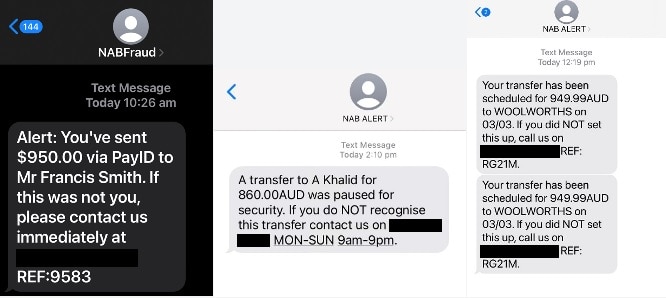
Calls and messages claiming to be from “NAB Fraud” or “NAB Alert”, or similar sender descriptions. This type of scam is called spoofing. Do not agree to transfer any money or provide any information.
SMS or call details (March 2023)
- The caller or SMS may say there has been a new transfer, or there has been suspicious activity on your account.
- You may be asked to transfer funds to a “safe account”.
- While we’ve been working with the telecommunications industry to prevent fake texts being sent in the same thread as legitimate NAB messages, scammers are still able to change the way their number appears in your phone.
- This is not a sign that NAB systems have been breached in any way– it simply means a criminal has spoofed our number and is impersonating us.
SMS phishing examples
How to protect yourself
- If you receive a call or text message of this nature, do not agree to transfer any money or provide any information.
- We will never send you an SMS about a transaction or fraud alert with a link in it.
- If you receive an SMS that’s pretending to be your bank and it includes a phone number to call – search the internet to see if it is really a number that belongs to that organisation.
- We will never ask you to transfer money to another account to keep it safe – it’s safe where it is.
- If you’re unsure as to whether the call or text is legitimate, contact us directly on the number on the back of your NAB card.
- If you have received this type of text message or phone call, please report it to phish@nab.com.au (or 0476 220 003 for text messages), without providing any information, and then delete the text message.
- If you have received this type of call or text message and have transferred money or provided information, contact us on 13 22 65 or visit your nearest NAB branch immediately.
Email phishing
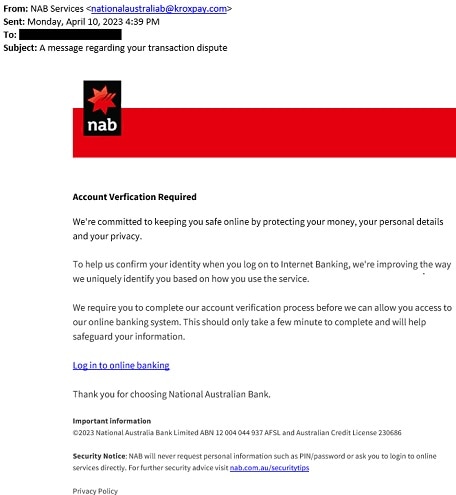
A NAB branded email targeting NAB customers stating that you need to confirm your identity to access internet banking. Do not click on the link.
Phishing email details (April 2023)
- The email asks you to click on a link to verify your account, which leads to a fake NAB website asking for personal information and banking credentials.
- We will never ask you to confirm, update or disclose personal or banking information via a link in an email or text message.
- When sending phishing emails, criminals sometimes set the sender’s name as “NAB”, meaning that fraudulent email can appear with the display name as “NAB” despite not being from an official NAB email address. This is not a sign that NAB systems have been breached in any way– it simply means a criminal is impersonating our brand.
Phishing email example
How to protect yourself
- Do not click on the link.
- If you have received this type of email, please forward it to phish@nab.com.au and then delete the email.
- If you have clicked on the link or entered your details after receiving this type of email or text message, contact us on 13 22 65 or visit your nearest NAB branch immediately
Scams
-
Australians are currently being targeted by scammers posing as a bank or financial institution promising lucrative investment or term deposit returns.
Scam details (April 2024)
- Scammers may contact people on social media or via email posing as a broker or advisor from a bank or financial institution.
- The scammer may send the customer a very convincing looking “prospectus” highlighting the “offer”. The “prospectus” may copy the branding of a legitimate financial institution or bank.
- The scammer may impersonate the names and signatures of legitimate people working at the financial institution or bank.
- The investment or term deposit offers better than average returns.
- The person may be instructed to make a transfer to another financial account, or to a cryptocurrency wallet.
How to protect yourself
- Be very careful when you receive an unsolicited message on social media or via email advising of an investment opportunity or term deposit.
- Remember, if it is too good to be true, it usually is. Be suspicious of opportunities promising higher than average returns.
- Always closely check the email address of the person sending you the opportunity, make sure it matches the email address of the organisation.
- Contact the financial institution or bank directly through their official contact channels (available on their website or on the back of a card) and confirm the offer is legitimate.
- Read our investment scams article, opens in new window
If you believe that you have paid money in a bank impersonation scam or investment scam, contact us on 13 22 65 or visit your nearest NAB branch, opens in new window immediately.
-
Callers pretending to be immigration and law enforcement agencies are targeting international students. These are not legitimate. Do not act on the threats.
The call may have some of the below features:
- The caller may claim to be from a government agency requesting payment for a temporary visa and threaten legal action if you don’t pay.
- The caller may state that your identity has been used in a crime such as money laundering or creating fraudulent documents
- They may demand that you transfer money to international authorities for verification.
- They may threaten you with extradition or deportation, cancellation of visas, or criminal charges.
- You may get an email with a link or a call with threatening language requesting immediate payment.
- They may make threats to your life and request you transfer all your funds for verification immediately.
How to protect yourself
- Do not act on the threats.
- Never send money or provide personal or banking information to the caller.
- Do not respond to any email containing these threats as this can lead to further intimidation and malicious activities.
- Talk to your friends or family if you’re ever unsure about a call or email and something seems suspicious. This allows you to get a second opinion and can help spread awareness about a potential scam.
- If you have any concerns about your safety, contact police on 131 444 immediately.
- If you believe your personal or bank information is compromised, contact us on 13 22 65 or visit your nearest NAB branch, opens in new window immediately.
- Visit the AFP website for more information https://www.afp.gov.au/news-centre/feature/be-alert, opens in new window
-
Scam details (November 2023)
- An invoice scam is when a business receives an emailed invoice from a supplier whose email account has been compromised by a criminal.
- The criminal will alter the payment details on the invoice to a fraudulent or mule account.
- As the invoice looks legitimate, the business doesn’t question the payment details, and sends the payment to the fraudulent account.
- Another variation of an invoice scam is when a business receives a request advising a supplier’s or employee’s payment details have changed, and to make payments to a new account.
How to protect yourself
Before processing invoices, check the payment details against the last invoice. If they have changed, or you receive a request to update payment details:
- Do not proceed with the transaction(s), and
- Call the supplier/sender to confirm the legitimacy of the request, using a known contact or publicly listed number. Do not call the number on the new invoice/email.
- Speak to your banker about adding extra security to your account by using a security token, dual authorisation and segregation of duties.
- Learn more about protecting your business from invoice scams.
- If you have received an email of this type and actioned the request, please contact NAB on 13 22 65 and ask for the Anti-Scam Investigations Team.
- While the bank will make every effort to recall funds, recovery is not guaranteed.
-
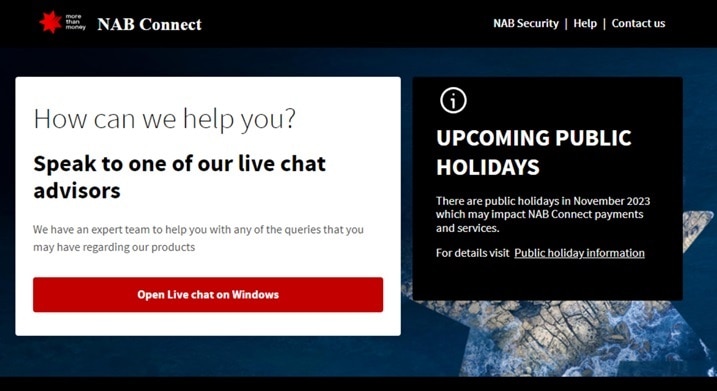
Cyber criminals are creating fake NAB and NAB Connect websites. Do not click anything on this page and close the window immediately.
Scam details (November 2023)
- A fake NAB and NAB Connect page will ask customers to open a "live chat".
- These links will download a remote access software for criminals to take control of customer devices.
Fake page example
How to protect yourself
- Do not click anything on this page and close the window immediately.
- NAB will never ask customers to download programs directly from our site.
- NAB will always direct you to the appropriate download source.
- If you believe your bank information is compromised, contact us on 13 22 65 or visit your nearest NAB branch immediately.
-
Fake Ticketing Scams
Australians are being targeted by scammers selling fake or duplicate tickets to popular events such as concerts, music festivals and sporting matches. Unfortunately, the tickets either don’t exist or are fake.
Scam details (October 2023)
- Criminals offer tickets to often sold-out events at heavily discounted prices. Buyers may not know their tickets are fake until they arrive at the event and are refused admission.
- Scammers can create fake ticketing websites that look legitimate and hook buyers in through email scams, or pretend to offer tickets through lotteries and competitions that require payment or personal information to secure the tickets.
- Fake ticket scams are also popular on social media and online marketplaces.
- Buyers may be instructed to pay using unusual payment methods, such as cryptocurrency or direct money transfers.
- Ticket reselling websites exploit events in high demand, reselling tickets at excessively high prices.
How to protect yourself
- It’s recommended that you only buy tickets from authorised ticket sellers. You can check the websites or social media pages of the event promoter, venue, performer or sporting club to find out how to buy official tickets.
- Find out when the tickets are going on sale. Tickets available before the official date may be fake.
- If you search for tickets online, be cautious about clicking on ads that appear at the top of search results, as scammers sometimes pay for these ads to appear at the top, so you might think you’re visiting a legitimate ticket website.
- It’s safer to pay for tickets using a credit card, as your funds may be recovered if something goes wrong. Be cautious if sending funds to a ticket seller’s bank account – private sales don’t offer buyers any protection if the ticket isn’t real.
- If you’re directed to an unexpected website during the payment process, don’t proceed with the purchase.
- Buying tickets through social media or online marketplaces always comes with a risk. If you decide to proceed with the purchase, do so with caution, checking whether the seller has a legitimate profile, positive ratings, or other listings.
- People are quick to call out a scam, so always check reviews for the seller or website before making a purchase.
- Remember, if it is too good to be true, it probably is.
If you believe that you’ve paid money to a scammer in a ticketing scam, contact us on 13 22 65 or visit your nearest NAB branch immediately.
-
We’re aware of NAB-branded emails sent by scammers which states that your payment is on hold, and you need to upgrade to a business account. You may be asked to transfer funds back to the buyer to secure the transaction. Do not send funds. This is a scam.
NAB-branded scam details (August 2023)
Scammers may contact people listing items on online marketplaces.
Using what’s often a fake or compromised social media profile, they make an offer to purchase the item.
They’ll ask for the seller’s email to confirm the transaction.
Shortly after, the scammer claims they have sent the money for the goods using a “NAB” account, and the seller should check their email.
The seller receives a fake email from “NAB”, claiming the funds are on “hold” because the seller does not have a “business account”.
The scammer may then claim that they have sent extra money to upgrade the seller’s account, which they may pressure the seller to immediately reimburse. However, no money will appear in the seller’s account.
Fake NAB-branded email example

How to protect yourself
Do not transfer any funds.
If you have received this type of email, please forward it to phish@nab.com.au and then delete the email.
If you have transferred funds after receiving this type of email, contact us on 13 22 65 or visit your nearest NAB branch, opens in new window immediately.
-
Scammers ask you to upgrade your PayID account to a business account, give them your PayID email and send them more funds. Do not send funds to the buyer. This is a scam. There's no such thing as a PayID account upgrade.
Scam details (February 2023)
- Scammers may contact people listing items on online marketplaces.
- Using what’s often a fake or compromised social media profile, they make an offer to purchase the item being sold online using PayID.
- They’ll either ask for the seller’s PayID email or push the seller to setup a PayID using their email.
- Shortly after, the scammer will claim they have sent the money for the goods, but “PayID” is saying the transaction couldn’t be completed because the seller does not have a “business account”.
- The scammer then claims they have sent extra money to upgrade the seller’s account, which they will pressure the seller to immediately reimburse. However, no money will actually appear in the seller’s account.
- The scammer will then use the seller’s supplied email address to send them a fake PayID email (similar to the below) as proof.
How to protect yourself
- Do not send funds to the buyer. This is a scam. There's no such thing as a PayID account upgrade.
- You never need to send money first to receive a payment via PayID.
- You never need to take any additional action, like upgrading your account or paying additional fees, before money can be received into your bank account.
- You’ll never receive communication directly from PayID via email, text or messenger (PayID is managed by your bank).
- If you have received this type of email, please report the buyer to the respective marketplace service and then delete the email, text or messenger message.
- If you have received this type of email and have transferred money or provided information, contact us on 13 22 65 or visit your nearest NAB branch immediately.
- Learn more about buying and selling scams.
How to report fraud and scams
- Forward suspicious emails to phish@nab.com.au and then delete.
- Forward suspicious text messages to 0476 220 003 (047 NAB 0003) and then delete.
If your online security has been compromised, let us know immediately. Call us 24 hours, 7 days a week - toll free and quote ‘Fraud Assist’.
- Within Australia: 13 22 65
- Overseas: +61 3 8641 9083

Previous examples of scams and phishing activity
Scams
-
Scam call details (November 2022)
- Scammers are contacting people who have been impacted by the recent flooding on the east coast of Australia.
- These individuals may present themselves as a Claims Manager from your insurer and instruct you to pay your insurance excess directly to their bank account.
How to protect yourself
- If you’re contacted with a request of this nature, ask for the person’s name and employee number.
- Contact your insurer directly through official channels (for example, using the phone number on their official website or on your policy) to verify whether the request was legitimate.
- Customers should not sign any documents, make payments, or provide further information (including over the phone) until you’ve spoken to your insurer directly.
- Your insurer will never ask you for payment before your claim is approved.
- If you provided information or transferred funds following this kind of interaction, contact us on 13 22 65 or visit your nearest NAB branch immediately.
-
Scam call details (October 2022)
- Australians are currently being targeted with investment scams promising lucrative returns, some of which are impersonating NAB.
- The ACCC advises that these fake investment companies are proactively contacting Australians online or by phone, and claiming to be stockbrokers offering investment advice, promotions, and hot tips or offering free investment seminars.
- The fraudster will claim the investment is low-risk with quick and high returns, or encourage you to invest in overseas companies.
- The offer may sound very legitimate, with resources to back up their claims. They may say you need to act quickly and invest, or you will miss out.
How to protect yourself
- Before transferring any money to an investment company, check the Australian Securities and Investments Commission’s (ASIC) list of companies that you should not deal with, opens in new window.
- Learn more about investment scams on the ACCC’s Scamwatch website, opens in new window.
- Read our investment scams article.
- If you receive an unsolicited offer to make an investment, do not respond. Immediately report it to Scamwatch. If it’s NAB-branded, also report it to NAB.
- If you believe that you have paid money to an investment scam, contact us on 13 22 65 or visit your nearest NAB branch immediately.
-
Scam call details (October 2022)
- You may receive a call where the caller pretends to be from organisations like your bank, Telstra, NBN, Microsoft, Amazon, ATO or the police, or receive a text message asking you to call your bank due to security concerns.
- Once on the call, the caller may request remote access to your computer and bank accounts, or ask you to provide personal or banking information.
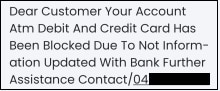
Example scam text message
Here is an example of a text message stating there is a problem with a credit card, asking the recipient to call the number to protect their accounts. This leads to a scam call.
How to protect yourself
- Never give an unsolicited caller remote access to your computer or online bank accounts, or provide personal or banking information.
- Ensure you read any SMS codes sent to you in full. If it states “Your NAB secret code is xxxxx. Do not provide this to anyone, even NAB”, do not disclose this code to anyone.
- If you ever have concerns as to the legitimacy of a call, hang up and call the company back on a publicly available number (e.g. NAB’s number is available on the back of your card).
- If you have provided information on this type of call, contact us on 13 22 65 or visit your nearest NAB branch immediately.
- For more information on scam calls, read our article 'How to spot scam phone calls'.
-
Scam details (September 2022)
- You may receive a call from a scammer pretending to be a NAB employee who’ll claim there’s a fraudulent transaction on an account.
- They’ll ask you to provide your User ID and share a one-time code via your security token to ‘reverse the transaction’. Do not share the code.
How to protect yourself
- If you ever have concerns as to the legitimacy of a call, hang up and call your banker or NAB’s publicly listed number (NAB’s number is available on the back of your card).
- If you have provided information on this type of call, contact us on 13 22 65 or visit your nearest NAB branch immediately.
- For more information on scam calls, read our article 'How to spot scam phone calls'.
-
Scam details (August 2022)
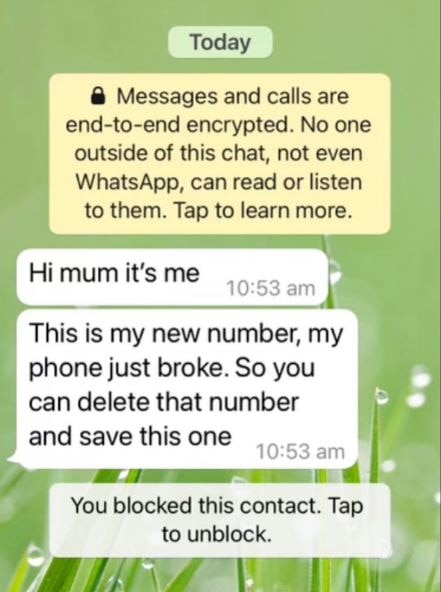
- You may receive a scam WhatsApp message pretending to be from people you know.
- These messages usually claim to be from a relative or friend stating that they have broken their phone and have a new phone number.
- They then request money for reasons such as purchasing a new phone, to buy flights to return home from overseas, or for legal assistance.
Example message
How to protect yourself
- If you receive a message of this nature, do not respond.
- Contact the person via another trusted channel (such as their usual mobile number or email address) to confirm the request first.
- If you have received this type of text message, please forward it to 0476 220 003 (047 NAB 0003) or take a screenshot, email it to phish@nab.com.au and then delete the text message.
- If you have received this type of text message and have sent funds or information, contact us on 13 22 65 or visit your nearest NAB branch immediately.
SMS phishing
-
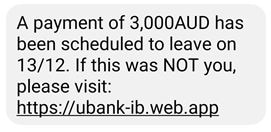
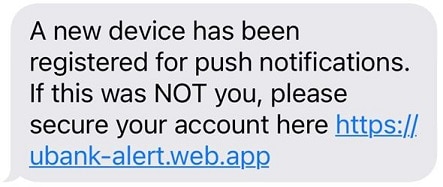
SMS phishing details (December 2022)
- The messages claim to be from ubank stating push notifications have been registered to your device or a payment has been schedule.
- It asks you to click on a link to secure your account if this was not you. This link leads to a fake ubank website asking for personal and banking information.
- Do not click on the link.
SMS examples
How to protect yourself
- Do not click on the link. ubank will never ask you to confirm or disclose banking information via a link in an email or text message.
- If you have received this type of text message, please forward it to 0476 220 003 (047 NAB 0003) or take a screenshot, email it to phish@nab.com.au and then delete the text message.
- If you have received this type of email or text message and have clicked on the link or entered your details, contact us on 13 22 65 or visit your nearest NAB branch immediately.
-
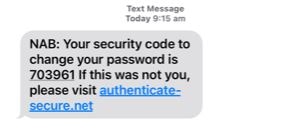
SMS details (September 2022)
- The message claims to be from NAB stating that you requested a password change and provides a security code.
- It directs you to click on a link if you didn’t request the code, which leads to a fake NAB website asking for personal and banking information.
- Do not click on the link.
SMS example
How to protect yourself
- NAB will never ask you to confirm, update or disclose personal or banking information via a link in an email or text message.
- If you have received this type of text message, please forward it to 0476 220 003 (047 NAB 0003) or take a screenshot, email it to phish@nab.com.au and then delete the text message.
- If you have received this type of email or text message and have clicked on the link or entered your details, contact on 13 22 65 or visit your nearest NAB branch immediately.
Email phishing
-
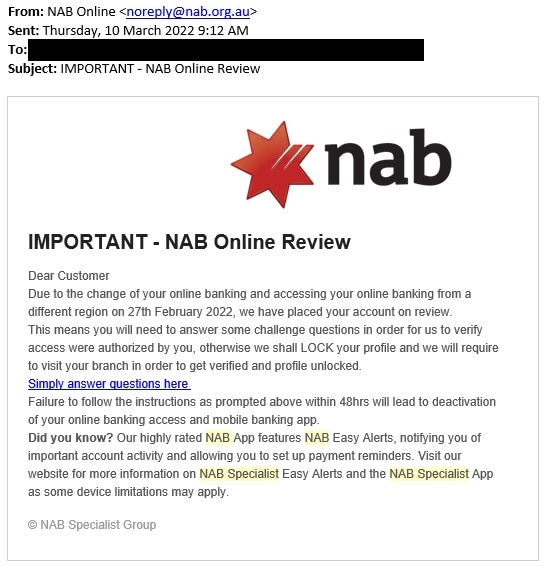
Phishing email details (March 2022)
- The email claims to be from “NAB Online” stating that your account has been placed on review and will be locked if you don’t verify your information.
- It asks you to click on a link to verify your account, which leads to a fake NAB website asking for personal information and banking credentials.
- Do not click on the link.
Phishing email example
When sending phishing emails, criminals sometimes set the sender’s name as “NAB”, meaning that fraudulent email can appear with the display name as “NAB” despite not being from an official NAB email address. This is not a sign that NAB systems have been breached in any way– it simply means a criminal is impersonating our brand.
How to protect yourself
- Do not click on the link.
- NAB will never ask you to confirm, update or disclose personal or banking information via a link in an email or text message.
- If you have received this type of email, please forward it to phish@nab.com.au and then delete the email.
- If you have received this type of email or text message and have clicked on the link or entered your details, contact us on 13 22 65 or visit your nearest NAB branch immediately.
-
Phishing email details (March 2022)
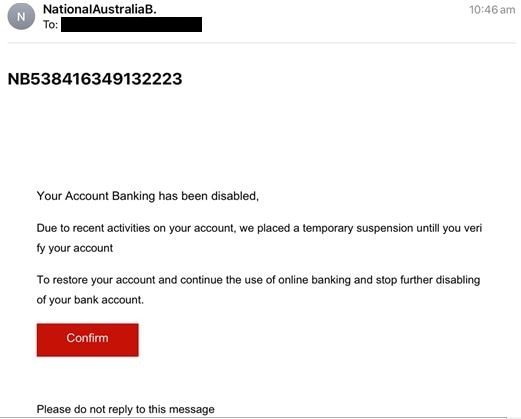
- Do The email claims to be from NAB stating your account has been disabled.
- It asks you to click on a link to verify your account, which leads to a fake NAB website asking for personal information and banking credentials.
- Do not click on the link. NAB will never ask you to confirm, update or disclose personal or banking information via a link in an email or text message.
Email example
When sending phishing emails, criminals sometimes set the sender’s name as “NAB”, meaning that fraudulent email can appear with the display name as “NAB” despite not being from an official NAB email address. This is not a sign that NAB systems have been breached in any way– it simply means a criminal is impersonating our brand.
How to protect yourself
- If you have received this type of email, please forward it to phish@nab.com.au and then delete the email.
- If you have received this type of email or text message and have clicked on the link or entered your details, contact us on 13 22 65 or visit your nearest NAB branch immediately.
-
Phishing email details
- These emails may appear to come from companies including McAfee, Norton, and NAB.
- The message claims that your anti-virus software has expired and asks you to click on a link to renew the software.
- This leads to a fake website asking for personal information.
- Do not click on the link. NAB will never ask you to confirm, update or disclose personal or banking information via a link in an email or text message.
Other examples
-
Details (November 2022)
We are aware that NAB customers may have been impacted by data breaches affecting organisations including Optus and Medibank. There is no impact to NAB’s systems as a result of these incidents.
You can learn more about protecting yourself online on our data breaches page or the NAB Security Hub.
-
Details (March 2021)
NAB is aware of criminals targeting businesses by stealing their physical merchant terminal and replacing it with a fake or disabled terminal.
Being alert to fraudulent payment activity can reduce the chances of your business falling victim to scams and suffering costly chargebacks and other financial losses.
-
Details (February 2022)
- It uses applications in the Google Play store to distribute malware, that look like device protection guards, history cleaners, and multi-factor authenticators.
- These apps have remote access and screen share capabilities.
- Two indicators your device may be infected are apps that ask for a high level of permissions, or that you notice are projecting your screen (seen on the “Notification Panel”).
- The app may provide pop ups requesting you to authenticate it and is known to leverage card details and use them for online purchases or bank transfers.
Learn how to spot a suspicious message
Watch our short video about the warning signs to look out for when receiving texts and emails.

Tips to stay safe online



Other security resources
Still need help?
Personal bank customers
Within Australia: 13 22 65
From overseas: +61 3 8641 9083
To get you to the right team faster, please follow these steps:
- Press ‘3’ on the main menu.
- Select the menu option most appropriate for your situation.
Business bank customers
Within Australia: 13 10 12
From overseas: +61 3 8641 9083
To get you to the right team faster, say ‘Fraud’ when prompted.
Important information
Apologies but the Important Information section you are trying to view is not displaying properly at the moment. Please refresh the page or try again later.