


Benefits of NAB Internet Banking
Banking online is quick, easy and secure. You can avoid the queues and do your banking anywhere, anytime. Here are just a few reasons to register today.
Manage your accounts in one place
Check your account balances and transaction history and if you don’t recognise a transaction, there's an option to get more information or dispute a transaction.
Enjoy safe and secure banking
Keeping your accounts secure is important to us. Find out about SMS security and what to do if you've been the victim of fraud or scams, learn how we're working to keep you safe, and ways that you can protect yourself from scams.
Bank anywhere, anytime
Enjoy the convenience of NAB Internet Banking on your desktop computer or tablet so you can complete everyday banking tasks quickly and easily.
Features of NAB Internet Banking
Here are just some of the great features NAB Internet Banking offers you.
Change your daily transfer limit
Set a daily transfer limit to Australian banks up to $40,000. The default limit is $2,500 if you’re not registered for SMS security or $5,000 if you’re registered for SMS security.
View and download online statements
View and download statements online. You can also get a proof of balance, interest statements and letters when you need them.
Transfer money overseas
Transfer your money securely overseas with online NAB international money transfers. Whenever you transfer money overseas in a foreign currency via NAB Internet Banking, your transfer fee will be $0.
How to register for Internet Banking
Bank online using your desktop or mobile by registering for NAB Internet Banking, opens in new window.
Desktop
-
1
Step 1
Click Register Now on the Login screen.

-
2
Step 2
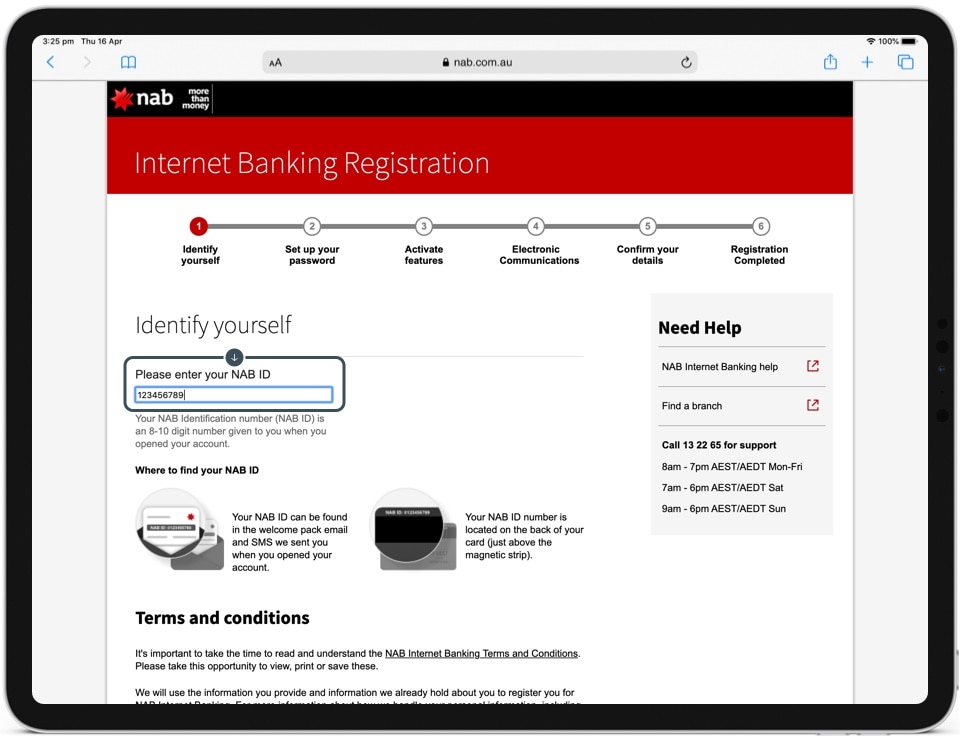
Enter your NAB ID.
-
3
Step 3
Read the terms and conditions, tick the check box to agree, then select Continue.

-
4
Step 4
A security code will be sent to your mobile, enter the code in the field. If you don't receive the code, try select the Send Security Code button.

-
5
Step 5
Alternatively you can use your Telephone Banking password or a Temporary Password provided by a NAB banker.
![]()
-
6
Step 6
Enter a new password in the Create password field, and again in Re-enter password field. Select Continue.
![]()
-
7
Step 7
Ensure Pay Anyone is ticked to allow transfers to others and select Continue.
![]()
-
8
Step 8
Enter your email address and select Online Statements to go green. Select Continue.
![]()
-
9
Step 9
Check all your details are correct. A new security code will be sent to your mobile phone. Enter the new security code and select Submit.
![]()
-
Complete
You’re now ready to start using NAB Internet Banking. Click the Start Internet Banking button to begin.
![]()


iOS
-
1
Step 1
Tap Login.

-
2
Step 2
Tap Register for Internet Banking.

-
3
Step 3
Enter your NAB ID.

-
4
Step 4
Read the terms, then tap the check box to agree.

-
5
Step 5
Tap Continue.
![]()
-
6
Step 6
A verification code will be sent via SMS to your registered number.
![]()
-
7
Step 7
Enter the security code.
![]()
-
8
Step 8
Create a password. Alternatively, tap Use strong password generated by Chrome for Chrome to create a password for you.
![]()
-
9
Step 9
Re-enter your chosen password.
![]()
-
10
Step 10
Tap Continue.
![]()
-
11
Step 11
Enter your email address.
![]()
-
12
Step 12
Tick the check box beside Online Statements, then tap Continue.
![]()
-
13
Step 13
Check your details are correct, then press Submit.
![]()
-
Complete
You’re now registered for NAB Internet Banking.
![]()


Android
-
1
Step 1
Open the NAB app.

-
2
Step 2
Tap Login.

-
3
Step 3
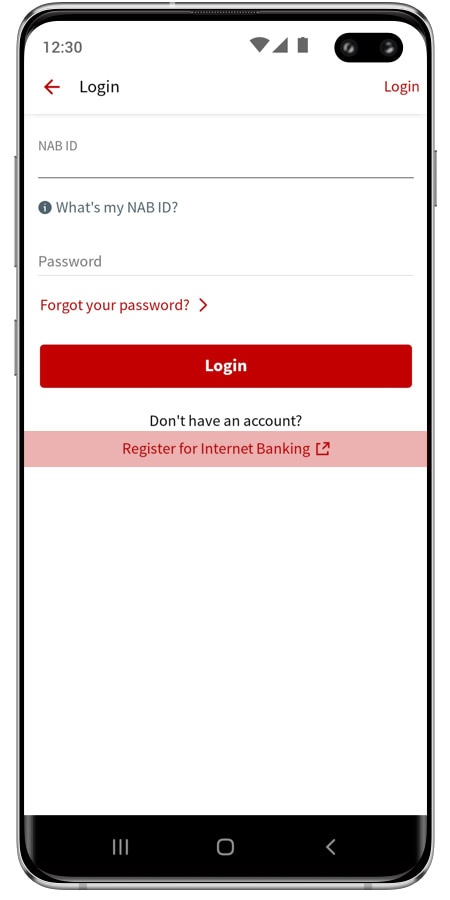
Tap Register for Internet Banking at the bottom.
-
4
Step 4
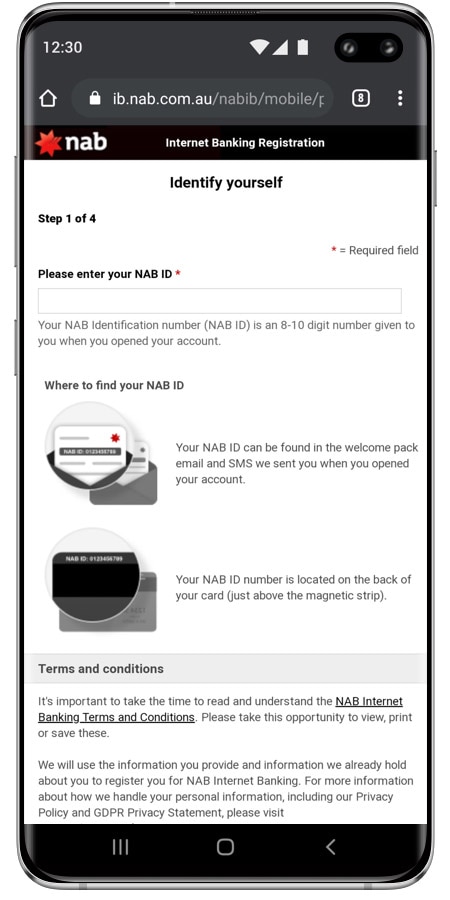
Enter your NAB ID.
-
5
Step 5
Read the terms, then tap the check box to agree.
![]()
-
6
Step 6
Tap Continue.
![]()
-
7
Step 7
A verification code will be sent via SMS to your registered number.
![]()
-
8
Step 8
Enter the security code.
![]()
-
9
Step 9
Create a password. Alternatively, tap Use strong password generated by Chrome for Chrome to create a password for you.
![]()
-
10
Step 10
Re-enter your chosen password.
![]()
-
11
Step 11
Tap Continue.
![]()
-
12
Step 12
Enter your email address.
![]()
-
13
Step 13
Tick the check box beside Online Statements, then tap Continue.
![]()
-
14
Step 14
Check your details are correct, then press Submit.
![]()
-
Complete
You’re now registered for NAB Internet Banking.
![]()


View all online help guides
Learn how to do everyday banking tasks using your phone, tablet or desktop computer with our simple how-to guides. We show you how to register, set up a PayID® for faster payments, dispute a transaction online and much more.

Bank online with the NAB app
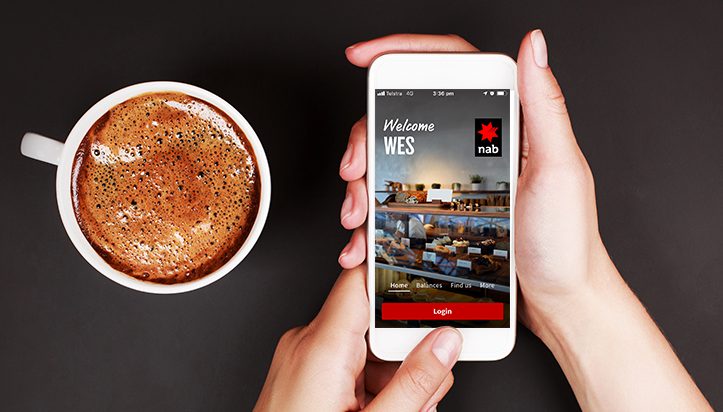
Download the NAB app for a more convenient internet banking experience. Use our smart phone app to view balances, transactions and authorise payments on the go.


How to make the most of online banking
Make sure you're using all of the available online banking features and services we offer, including online statements, fast payments and our tool to help you track expenses.
Other banking services to consider


Help and support
We have a range of useful guides and tools to help you manage your online banking.
Other ways we can help
Use our help guides, FAQs and other support services to help you manage your banking more easily.
Get in touch
Customer Support Tool
Solve problems quickly online with our easy-to-follow guides. Simply select a topic and we’ll direct you to the information you need.
Contact us
Visit our personal banking contact page for FAQ’s and how-to-guides, help from our virtual assistant and contact numbers.
Visit a NAB branch
Visit us in person at your nearest NAB branch or business banking centre.
Terms and Conditions
Apologies but the Important Information section you are trying to view is not displaying properly at the moment. Please refresh the page or try again later.
NAB Internet Banking
Consider the Internet Banking terms and conditions which apply when using NAB Internet Banking and the NAB app. The NAB app is compatible with Android and iOS, minimum platform requirements apply. Android is a trademark of Google LLC. iOS is a trademark or registered trademark of Cisco in the U.S. and other countries and is used under license.
App Store is a service mark of Apple Inc. Google Play and the Google Play Logo are registered trademarks of Google LLC.
PayID is a registered trademark of NPP Australia Limited ABN 68 601 428 737